FH2 beginner's setup
A downloadable mod for Windows
A comprehensive guide to setting up Forza Horizon 2 on PC, including optional mod installation, troubleshooting, and customization. Covers Azimuth, ForzaHorizon2_ExtraOptions, and additional community tools to help improve and personalize your experience. :3
Download
Install instructions
FH2 Beginners Setup
This guide will help you get Forza Horizon 2 running on PC using Azimuth. It also covers optional mods such as ForzaHorizon2_ExtraOptions, troubleshooting, and useful tools to improve your experience.
*ALL RIGHT BELONG TO CREATOR WHO MADE (Azimuth,Extra Options,and any other stuff included) This is an unofficial, independent project and is not affiliated with or endorsed by Microsoft, Xbox, or Playground Games.
Website for Azimuth---> Azimuth by Almost There Games<---
What You'll Need
- A copy of Forza Horizon 2 Xbox one edition (scroll to bottom if download too slow)
- Azimuth
- Windows 10 or Windows 11
- 16 GB RAM recommended
Setup
- Download and extract Azimuth.
- Open Azimuth.
- Select your Forza Horizon 2 folder.

- Make sure the folder contains the following:

- Move the Forza horizon 2 folder into the Azimuth folder
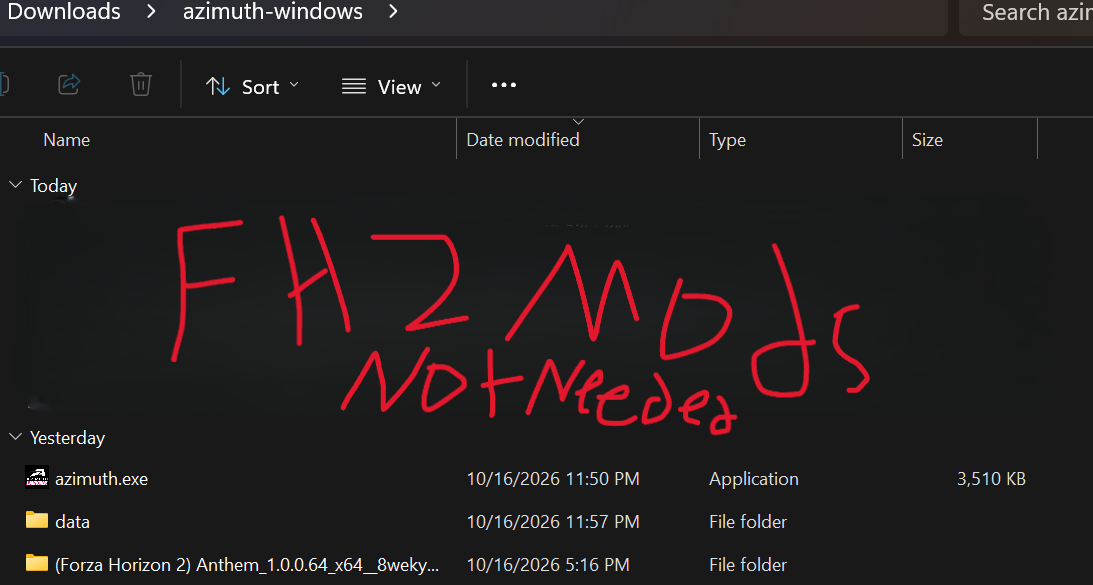
- Open Azimuth.
- Click the inner file as referenced to step 4 image or similar not the first outside file when opening FH2 inside Azimuth to configure for first time.
- Storm Island also needs to be added separately in Azimuth
1. From the Forza Horizon 2 configuration menu, choose Add another.
2.Make sure the file is extracted and put inside the Azimuth folder
3. Select StormIsland_1.0.0.36_neutral__8wekyb3d8bbwe. or use hyperlink to get
4. Click Choose to confirm.
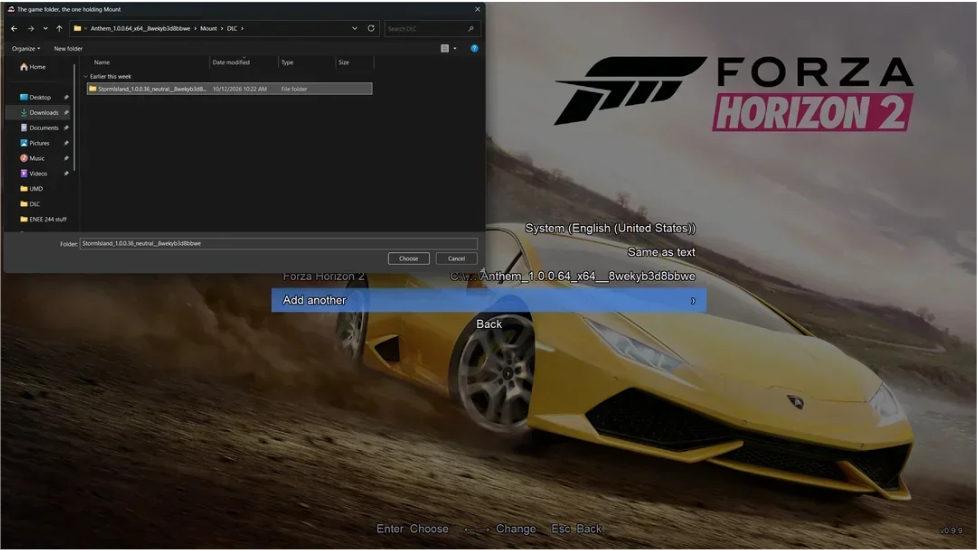
14. Start and enjoy the game :3
________________________________________
Optional Mods Help
ForzaHorizon2_ExtraOptions (0.9.10)
Release v0.2.88-latest · RokkuDayo/ForzaHorizon2_ExtraOptions
Features
- Change your car anywhere.
- Autodrive.
- Drift Camera.
- FOV sliders for every camera type.
- Roof toggle for supported cars during free roam.
- Lights and turn-signal controls for all cars.
- Stock rim category with all factory wheels.
- Aftermarket rim category with all aftermarket wheels.
- Custom spawn locations.
- Custom Gamerpic support.
- "mediapc" modding folder support.
- Intro skip " refers to the developer intro videos. Not the prologue video and driving sequences."
- Download Forza Horizon 2 - Extra Options.
- Open the downloaded ZIP file.
- Open the Azimuth folder inside the ZIP.
- Copy all 4 files.
- Extract all the 4 files from the "Azimuth" folder in this ZIP to Azimuth's main folder where "Azimuth.exe" is located.
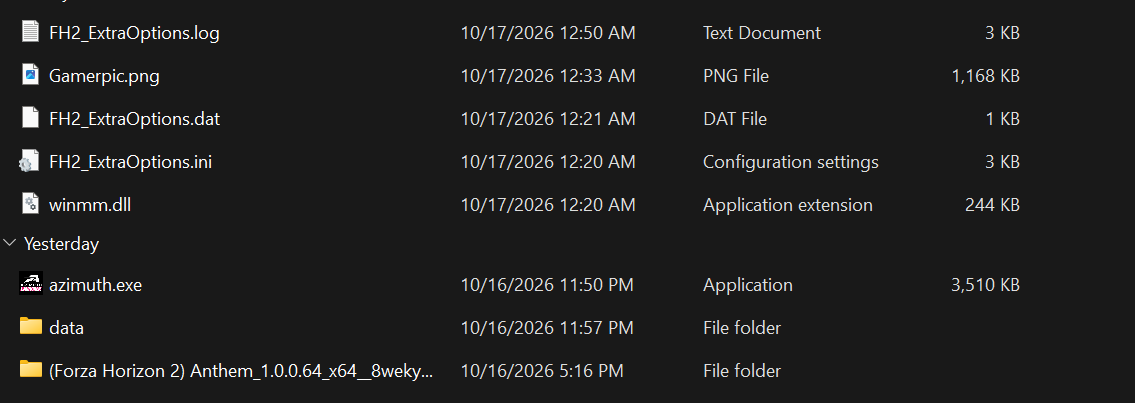
Instructions below are for 0.9.9.
- Copy all 3 files.
- Paste them into: Azimuth\data\bin
- When asked, replace the existing DLL file.
On Proton Experimental (Wine 11.0) + Azimuth 0.9.10, 0.2.88 works without this PR when the override is winmm=n,b. Did you use winmm=n? That would explain the proxy loading itself.
Where to set it:
- Steam (launch options):
WINEDLLOVERRIDES="winmm=n,b" %command% - umu-run:
WINEDLLOVERRIDES="winmm=n,b" WINEPREFIX=<prefix> PROTONPATH=<proton> umu-run azimuth.exe - Wine:
WINEDLLOVERRIDES="winmm=n,b" WINEPREFIX=<prefix> wine azimuth.exe - Lutris: Runner options > DLL overrides (
winmm=n,b). AWINEDLLOVERRIDESenv var gets replaced there.
Controls
- Autodrive: D-Pad Down or F2
- Toggle Lights: Press Right Stick
- Toggle Roof: Hold Right Stick for 3 seconds while stopped
- Turn Signals: Hold D-Pad Left or D-Pad Right for 1 second
Custom Gamerpic
You can replace: Gamerpic.png with any image you want.
Requirements:
- Maximum resolution: 2048x2048
- Under 16 MB file size
Notes
- Some features are experimental and may not work perfectly.
- For best results with roof animations, set Car Detail to High or Ultra in Azimuth.
- Most features can be enabled, disabled, or adjusted directly from the in-game menus.
- The Treasure Map is disabled by default and can be enabled through the INI file.
- Some vehicles may have visual issues with roof animations due to limitations in the original game assets.
_________________________________________
FH2 Mods Collection (fh2-mods)
conner-mcvay/fh2-mods: Monorepo for fh2 mods.
A collection of mods and tools for Forza Horizon 2 on PC. These mods are designed for Azimuth 0.9.9+ and require Forza Horizon 2 - Extra Options 0.2.74 or newer.
Requirements
- Azimuth 0.9.9
- FH2 Extra Options 0.2.74+
- Forza Horizon 2 (1.0.0.64)
Included Mods & Tools
Cockpit FOV
Increases the cockpit and driver camera FOV from 48 to 70 for a wider field of view.
FM5 Car Importer
Allows you to import compatible cars from Forza Motorsport 5 into Forza Horizon 2 using your own FM5 game files. * The developer has made a statement you may use as you wish but I'm marking it out I don't condone this mod--->0.10.0 progress, and a note about copies of Azimuth floating around - Azimuth by Almost There Games<---
FH2Net (Experimental)
Experimental online free roam that allows you to play with others over a LAN or the internet using a server that you host yourself.
Time & Weather Menu
A simple in-game menu that allows you to:
- Change the time of day
- Freeze time
- Switch between clear weather and rain
- Create custom weather conditions
Installation
- Install Azimuth.
- Install Forza Horizon 2 - Extra Options.
- Download the desired mod or tool.
- Follow the instructions included with that mod.
- Launch the game and verify everything works correctly.
Notes
- These mods do not modify the original game files.
- Mods are installed through Extra Options' media override system.
- Some tools are experimental and may contain bugs.
- Always keep backups before installing additional mods.
_________________________________________
FH2 Cars & Gameplay Mods
FH2 Cars & Gameplay Mods is a simple tool that lets you customize different parts of Forza Horizon 2 without manually editing files. Everything can be changed through an easy-to-use settings window.
Release FH2 Cars & Gameplay Mods v1.0 · bmmbaaddt/FH2-Cars-GamePlay-Mods
Features
Traffic
- Increase or decrease traffic density
- Disable traffic completely
- Enable or disable traffic during races and road trips
Money & Skills
- Change credits earned from level-ups
- Change credits earned from races
- Adjust skill point rewards
- Adjust skill chain multipliers
- Prevent crashes from ending skill chains
Cockpit Camera
- Adjust cockpit camera FOV
- Adjust seating position
Car Performance
Modify individual cars:
- Power
- Turbo boost
- Tire grip
- Brakes
- Air drag
- Downforce
Requirements
- Windows 10/11
- Azimuth 0.9.9+ (0.9.10 recommended)
- Forza Horizon 2 (1.0.0.64)
- Python 3 (for advanced car features)
Installation
- Download the latest release.
- Extract the ZIP file.
- Place the FH2 Mods folder next to
azimuth.exe.
Example: 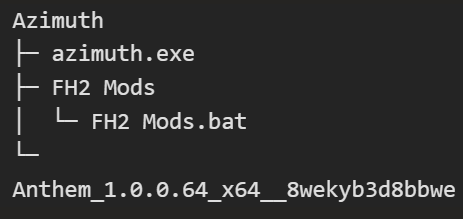
- Make sure the game is closed.
- Run: FH2 Mods.bat
- Change your settings.
- Click Apply or Apply & Play.
Useful Tips
- If you increase power, also increase grip and brakes.
- Keep your total credits below roughly 2 billion.
- Turbo boost only affects turbocharged vehicles.
Restore Original Files
If something breaks:
- Open the tool.
- Click Restore Originals.
The tool automatically creates backups and can restore the original game files with one click.
Notes
- The game must be closed before making changes.
- Original files are backed up automatically.
- Settings do not stack on top of previous changes.
- If you're troubleshooting Azimuth, restore the original files before asking for support.
Tip: Install and test Azimuth first, then Extra Options, and finally Cars & Gameplay Mods. This makes troubleshooting much easier. :3
_________________________________________
YOUR MUSIC. YOUR HORIZON.
FH2 Horizon Radio is a free Windows companion app for Forza Horizon 2 running through Azimuth. Bring your own YouTube playlists and music into the game, complete with radio HUD information and Horizon Festival speaker effects.
Features
- Import public YouTube playlists, videos, and music queues.
- Display track information directly on the FH2 radio HUD.
- Native Horizon Festival speaker audio effects.
- Create, save, import, and export custom radio stations.
- Search YouTube and add music without a Google account.
- Custom station names and Horizon Radio branding.
- Volume normalization and playback controls.
- Recently played tracks, favorites, and listening history.
- Multiple configuration profiles and language options.
- Automatic pause, resume, and station synchronization with the game.
Requirements
- Windows x64
- Azimuth 0.9.9 or 0.9.10
- A legitimate Forza Horizon 2 (1.0.0.64) installation
Installation
- Extract the horizon-radio folder next to azimuth.exe.
- Launch FH2 Radio.exe.
- Add your music and enable the radio.
- Select the configured station in-game.
Notes
- No Google account is required.
- Music queues, preferences, and history remain stored locally on your PC.
- No game saves are modified.
- All downloads and features are completely free.
________________________________
Azimuth Mapper - Keypad Companion
Azimuth Mapper - Keypad Companion by Sam
Azimuth Mapper lets you play Forza Horizon 2 on PC through Azimuth using a keyboard and mouse. It creates a virtual Xbox controller and translates your inputs into gamepad controls, making FH2 fully playable without a physical controller.
Features
- Ready-to-use keymaps for Forza Horizon, NFS Heat, NFS Unbound, NFS Most Wanted (2005), and NFS Carbon.
- Fully customizable keybinds with support for saving and sharing custom layouts.
- Optional mouse steering for a more controller-like driving experience.
- Smooth steering, throttle, and brake inputs for precise vehicle control.
- Live controller preview showing exactly what the game receives.
- Quick hotkeys:
- F7: Toggle mouse steering
- F8: Pause or resume input mapping
Requirements
- Windows 10 or Windows 11
- Azimuth
- Your own legitimate copy of Forza Horizon 2
Installation
- Download and extract Azimuth Mapper.
- Launch the application.
- Follow the prompt to install the included ViGEmBus virtual controller driver if it is not already installed.
- Select a preset or create your own keymap.
- Launch Azimuth and start playing.
Notes
- The ViGEmBus driver is free and included with the download.
- Custom keymaps can be saved, loaded, and shared with other players.
- Mouse steering can be enabled or disabled at any time while playing.
- A controller is not required to use the application.
_________________________________________
Common Problems
Cannot load the native static-TLS helper
Usually means:
- A file is missing.
- Windows Defender blocked a file.
- The wrong Azimuth version was downloaded.
- The files weren't extracted correctly.
- A mod conflict/wrong version try removing one.
Game Won't Start
Check that:
- The correct game folder is selected.
- All required files are present.
- You're using a supported version of the game.
Notes
- No Xbox Live support.
- No multiplayer.
- No achievements.
- Azimuth is still in development, so some bugs are expected.
- GAME FILE NOT PROVIDED (find or obtain at your own risk)
*I recommend using Free Download Manager - download everything from the internet to help with speed btw unlike others this lets you pick your car unlike others with red Toyoda **I do not condone piracy please already own a copy of the game**